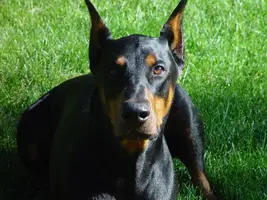
Dog photography tips

Right...unless you zoom in one it. Have you ever done that on your camera, Iceman?

done what? zoom in on the shot on the camera screen? sure i have but it's time wasting...when you have a large memory card on the camera you just keep shhoting and look at them on the PC screen.
 
Well, yeah, I guess, it's just nice to know you can do that with one you just took and can't re-take....just information for others here that didn't know that I guess. I totally get taking the 'hundred or so ' pics! I do that too! :)
 
Cropping does not always work..You WILL loose sharpness because you are magnifying the resolution, hence the blurring of the cropped area...for best results try to take close up shots (preferably with a telephoto lens if available)
Good shots always come from good cameras with a quality lens and the nice shot you like might be the one out of hundreds of shots taken.
When i take photos,usually i take at least a couple of hundred...sometimes much more...then i go through them one by one to find the right shot.

You're exactly right Iceman,I think cropping will work best using high resolution settings and optical zoom(not digital).I've only gone to a digital cam recently and the ability to take hundreds and reject most is the key for me,especially wildlife and bird pics in shade and zoomed out.My 16GB card was only 24$ and will hold all the hi-res pics I can take.I can always downsize them if needed.
Great thread idea Jan!!
 
:blush:Anal retentive.... :tiptoe:

Ok, this took me a couple of seconds....didn't know if you were explaining what AR stood for ..........

or calling hrd that!

And I was thinking, wait a minute, I didn't know what AR was either! :o:p

Then the light bulb went on....
 
see and thats what i mean, a 12 pixel should be clear when i crop and resize.

Maybe i just have a blurry dog
 
see and thats what i mean, a 12 pixel should be clear when i crop and resize.

Maybe i just have a blurry dog

I think your pics always look good here!! Maybe you aren't happy with them full size? Forgive me if I'm stating the obvious but even tho it's a 12mgpxl cam
doesn't mean you have the settings adjusted for the max resolution.(altho you probably do and I'm just being AR...LOL) The pic of Karma at the Botanical Gardens(?)is just beautiful!!
 
Thanks Don, I never really know how to work settings and stuff...

that pic is at the Riverwalk actually :)
 
hrd, I didn't think that your photo needed cropped. The background made the picture. It also depends on if you are trying to crop a picture that has already been zoomed in when the picture was taken. You're zooming in even more on the picture so depending on how zoomed in you were, the picture can only handle so much zoom before it gets all pixley and such. Haha does that even make any sense?
 
I think you can zoom out as far as the optical zoom will go without losing quality other than it being harder to keep stable and steady.In my cam there's a little stop when you reach the end of optical zoom and it changes to digital so I try to not go past that..I think the optical zoom actually uses the lens to zoom, the digital just enlarges the existing picture.
 
clover, i know, i am a big background person, and took the picture for that purpose, but i was playing around. i dont like to zoom that much cuz its harder to get still pics... but i always thought if you have higher pixel, then its spose to make it easier when you do crop and zoom in. but like don said, maybe i dont have my settings right
 
*My first post on this forum*

A word on heavy cropping - always try to frame your shot how you want it without having to do heavy cropping. No matter what quality camera you have, the more you crop the more image quality you lose. You won't see it as much in the digital file, but it becomes much more apparent when you try to turn that file into a print. Besides, if you make as many photographs as I do, you learn to save image quality and time post processing by trying to make the shot exactly how you want it before pressing the shutter release.

*Watch your backgrounds.
*Fill the frame with your subject unless the surrounding background is part of the story.
*Watch your backgrounds.
*Focus focus focus. Nothing will ruin an image faster than not having the subject in focus. That and a crappy, distracting background.
 
Welcome Julie and thank you for the helpful tips! :thumbsup:
 
wait, i think i missed something... did you say something about the background?

lol, today we went tubing... had some awesome backgrounds... but since we were floating.. by the time i got camera to click (damn film cameras) we floated into diff position and got diff background :(
 
We have some stunning pics on this site so I thought I'd start a thread with little tips and secrets to get that perfect shot of your dog. Hopefully everyone will add to it so we can have an informative thread on the subject.

I'll start with a couple things I've learned.

*Stoop to your dogs level. That's the number one mistake I see everywhere when people stand above the dog and snap the shot. If you can get down to his level it makes for a much better shot and the dog doesn't look disproportionate.

*Focus on the eyes. They're the main feature of a dog to show their personality so that's what you want to center the photo around.

*Crop the photo before you size it down (unless you're trying to get the background scenery in the shot). It will zero in nicely on your main subject so you can see the fine details.
Here is one example of a before and after of Boris.
SittinginfencefartherSept07sized.jpg


SittinginfenceSept07cropped.jpg


*Try to use natural light rather than a flash, if possible. We all know how many cases of "glow eye" you can get with the flash.

*Experiment. Take tons of different shots from different angles and it will increase your odds of getting that perfect shot tremendously.

*Watch the background. If possible, move to a different angle if there are lots of things in the background that would be distracting.

*If you have a macro lens, experiment with it. You can get some of the finest details of every feature of your dog using one.

*Watch the lighting in the area. If you have shadows on your dogs face it isn't going to come out as well as it could. If you have a window in the background (my dogs are notorious for standing in front of the window when I want to get that perfect shot), your dogs are going to come out underexposed, unless you have manual settings to adjust for the conditions.

For portrait photos

*Use a backdrop like a solid colored blanket, etc. if you're shooting in the house to make it look professional. If you're outside, try to set it up in an area with a nice natural background with no other distractions in it.

*Set your dog up in a perfect pose with an alert look on his face. Use treats, squeaky toys, play with different ring tones on your cell phone (that one will really give you a curious look), or have a helper in the background doing whatever they can to make the dog look alert.

*Again, take a ton of shots so you increase your odds of getting that perfcet photo.

And finally, if you don't have a decent photo editor, get one. There are some decent free ones online and they will let you do many basic things like cropping, red eye reduction, fixing color balance and resizing the photo.
Here are the links to a couple of good free downloads.

IrfanView - Official Homepage - one of the most popular viewers worldwide

Paint.NET - Free Software for Digital Photo Editing

I use two different ones you can purchase since I do a ton of different things with photos.
Here are the two I use most.

Photo Editing Software – PaintShop Photo Express 2010

edit photos, photo editing program | Adobe Photoshop Elements 8

Well, that's all I can think of off the top of my head, but I'd love it if everyone else would share their tricks and techniques. :)

Thanks for the tips I know some for these but it helps to remind me lol here is a pic that I love of Max I used the shadow on his face to advantage I liked the effect it created.:paw:
 
ok i don't know what i did where'd the pic go lol .. Swartz's law Murphy was an opptomist help me lol:blush:
 
I hope this works here is a picture of Max tried several times to upload so i hope this doesn't drive everyone crazy if it is on here somewhere more than once geez:blush:
 

Attachments

  • DSC01100.webp
    DSC01100.webp
    115.9 KB · Views: 16

Back
Top