Digital Photography Photo Editing

BiggyRat

Well-Known Member
Digital photo editing at first glance looks terribly complicated, well, to me anyway. The software to accomplish picture improvements is over the top fantastic, and surprisingly simple to navigate. It just looks so dam complicated. Just recently I stepped into the editing waters and floundered for a bit until watching some videos at the Adobe website. Will give a link and advice on that in a moment.

First you have to capture your shots. There is a thread here at DCF titled "Dog photography tips" with some really good advice to capture good pics of your Dobermans. The link to that thread: https://doberman-chat.com/community/threads/dog-photography-tips.3530/

There are a ton of software developers who offer digital imaging software. Most will get you where you want to go and some will have features you might never need. To name a few: Corel Paint Shop Pro, Adobe Photoshop, Adobe Elements, Adobe Lightroom, Nikon NX, Gimp, Canon Digital Photo Professional, there are many more and many are totally free. The purchase software generally offer a 30 day free trial. Most all of the software out there has a plethora of tutorials to help you along.

I jumped right in after downloading several of the trials, geez what confusion. Well, after so many different tutorials for each program I was about to give up. Since discovering "Getting Started with Adobe Photoshop Lightroom 5" delivered by Julieanne Kost, a new enthusiasm has risen. Although this reads like a commercial for one, I have no bias for or against any of the image editing programs.

My advice to anyone interested in digital photography is to watch two of the Adobe episodes. You don't have to choose their product as all others have similar options, but viewing their episodes will help you in your decision to go forward or not.

The link below is to the Adobe site and the two episodes I recommend are the fifth and sixth episodes in the list. Titled "Create Stunning Images" and "Enhancing Isolated Areas of an Image". These cover exactly what most folks would like to do with the 'not so good' photos they have taken, well if you are like me anyway. I have trash canned hundreds, if not thousands, of shots and come to find out many could have easily been cleaned up. The videos are lengthy, 21 minutes and 15 minutes, but they are definitely worth while. After viewing these 2 videos, you will probably know if you want to go further or leave it to others.

The link to the Adobe workshop episodes ---> http://tv.adobe.com/show/getting-started-with-adobe-photoshop-lightroom-5/
 
I so agree with this!!!! Kudos to you! I use Photoshop and Corel and love them both. Yes, there is a bit of a learning curve, but it all goes with the territory to get really nice pics. :thumbsup2:
 
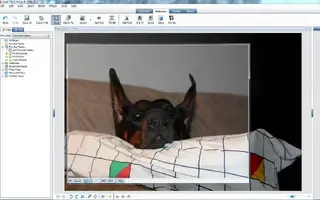
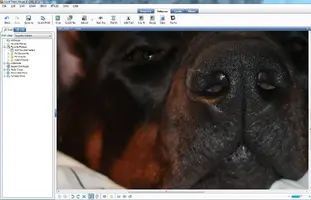
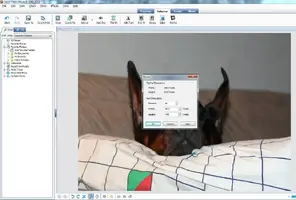
Here are a couple of screenshots I took of very basic photo editing with a basic program. I took these for a friend a few weeks ago, but thought they might be helpful here too.

Cropping to cut out the unwanted background and showcase the dog.
Cropping pic.webp

Red eye (glow eye) removal. See the above pic for the difference.
Red eye.webp

Resizing the photo so it's not too big to upload.
Resize.webp
 
You know what I would love to be able to do?? lol I want to take a subject in the picture and either blur the background or add a background of clouds or that type of thing to just bring out the subject of the photo.

It's probably too much to 'tutorial' here, but I used to have an old program that was sooooo easy to do this with, but now it seems so difficult. Even after watching a couple of YouTube vids. :facepalm:Something about 'layers' and such and ugh. I didn't spend a lot of time on it because I gave up pretty quick. lol

I know, someone's gonna tell me its a piece of cake. :rolleyes:
[DOUBLEPOST=1425222582][/DOUBLEPOST]
Resizing the photo so it's not too big to upload.
I've done this with the Paint program you told me about a long time ago and it's ok. Fairly easy. But when I have a lot of them to resize, I found that using a free program I have is so much easier. I don't have it on my laptop that I'm on now, so I forget the same....something like Visio? Anyway, I can select a bunch at a time and hit the Visio and it will do them all, 1,2, 3! Instead of doing one at a time, going through all those motions and then having to rename it (so I don't loose the original one)
 
Instead of doing one at a time, going through all those motions and then having to rename it (so I don't loose the original one)
I always replace them, unless it's something calendar worthy, then I resize one to calendar size (2400 x 1800) and name it full, then resize it again and do a "save as" and name it sized.

You know what I would love to be able to do?? lol I want to take a subject in the picture and either blur the background or add a background of clouds or that type of thing to just bring out the subject of the photo.
I use Photo Shop for that one, but I definitely won't tell you it's easy. ;) My avatar pic is one I recently did with a spring theme.
 
My avatar pic is one I recently did with a spring theme.
Thinking spring are ya, aren't we all? How many different shots did you involve in your avatar?

Bentley has multiple personalities. Chores got waylaid the day that pic was built.

33zz.webp
 
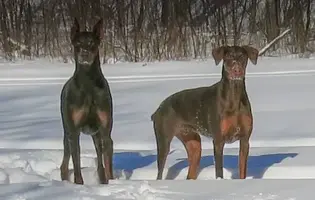
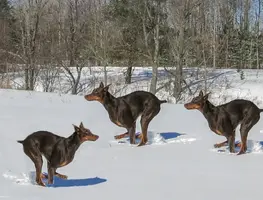
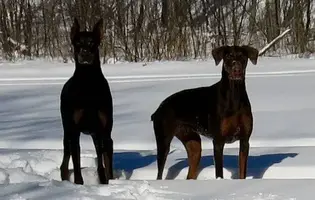
As an example of an easy edit are the following before and after. Previously I would toss a photo that showed the dogs so blackened. In 10 seconds open to close this happens.

What is amazing is this. The image captured by the camera has all the information of the shot and can be processed by you with software, just as if you were in a lab working with film and chemicals. Much quicker and easier than the old way.

As the case with Dobermans against a white snowy background, the camera takes the digital information and processes it into the photo it gives us based on the average between the bright white and dark Doberman in the image. Well you can see the result is way off. But, that same digital information can be used by us to process the photo to our liking. I always thought that whatever we got from the camera was all there was, but that is not true.

Now I am aware that what you see of my editing is probably laughable as I am color blind, but the point to this thread is: We can improve on what the camera gives us when necessary.

01.webp 02.webp
 
How many different shots did you involve in your avatar?
Just one, but it is time extensive if there isn't a solid background. Well I should say two, but that included the dogs, and changing the background.
 
I always replace them, unless it's something calendar worthy, then I resize one to calendar size (2400 x 1800) and name it full, then resize it again and do a "save as" and name it sized.
Why replace them? :scratch: I always figure if someday I want to print them out that I want the original with the biggest pixal size.
I use Photo Shop for that one, but I definitely won't tell you it's easy.
Yea, see, that's disappointing right there. LOL I wanna hear that its a breeze! :p
 
I always figure if someday I want to print them out that I want the original with the biggest pixal size.
If it is something I might print I will leave it bigger, but I'm not a big one on printing out pics unless they're something I want to frame.

Yea, see, that's disappointing right there. LOL I wanna hear that its a breeze! :p
It's mostly time consuming because you have to erase the background and get all the fine details, then layer a new background in. If you just want a blurry background it's usually a pretty basic setting on most cameras, or you can use a smudge tool in a photo program.
 
If you just want a blurry background it's usually a pretty basic setting on most cameras
:scratch: I've never heard of that. Can you expound on that a bit? I know there's probably a ton of setting on my little camera that I haven't touched on yet but I didn't know any camera can do that. Curious people need to know! :help:

or you can use a smudge tool in a photo program.
And I believe something like this was what I did with the old program I used to have (I think it before the big change in Operating Systems) It was such a great program and so fricking easy to use! :cus: If I remember right, you could simply take the 'smudge tool' (wide paintbrush) and simply swirl it around the subject. There were no 'layers' to do. Which, speaking of that, are very confusing! Eh, it just made me give up quickly. :anonymous :
 
Can you expound on that a bit? I know there's probably a ton of setting on my little camera that I haven't touched on yet but I didn't know any camera can do that. Curious people need to know!
All cameras vary, but it's changing your depth of field.
 
I have 30 years experience in photography and quite a bit of experience in digitally editing photos but you will not hear or see me use the word expert to describe my abilities in either! I have even had several photos published. The best camera to have for pet photography is without a doubt a DSLR. They are the most versatile cameras out there and the ones most likely to give you the shot you are looking for.

I offer my assistance to anyone that has need of help in either choosing a camera or doing basic photo editing. I am strictly doing this a a regular ordinary dog, nature, and photography enthusiast and not for any monetary gain in the techniques or products I recommend.
 
I have 30 years experience in photography and quite a bit of experience in digitally editing photos but you will not hear or see me use the word expert to describe my abilities in either! I have even had several photos published. The best camera to have for pet photography is without a doubt a DSLR.
I definitely agree about the DSLR and they're so versatile that you can get many lenses to suit your uses and can change the settings to work with the circumstances. We have 2 nice DSLR's and they're used pretty much daily.
You should post some of your work. :)
 
Yeah, the DSLR can be used as your interests evolve over the years. Want to focus on scenic shots? Then get a wide angle lenses for those expansive shots. Want to take frame filling images of small things like coins, stamps, or maybe even insects? A good macro lens does a great job.
 
Do not want to burst on here bragging and such to hawk my images. That is not why I posted. I had a pro take me under their wings for a few years where I used to live and I try to pass it forward for all the help, encouragement, and assistance he gave to me.
 
Just bumping this since there have been so many questions about resizing photos lately.
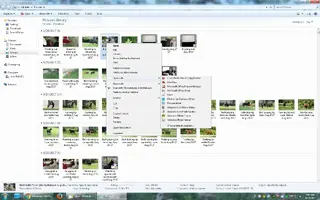
Pretty much every PC has at least a few different basic photo editors, even if you don't realize it. All you have to do is right click on the photo and hit "open with" and it will give you a list of options of what you have built in. I'm not sure if it's the same with Mac but I'm guessing it's probably similar.
Open photo with.webp
 

Back
Top