Playing With Photoshop

Archer

Hot Topics Subscriber
I am in the process of getting some pictures together of Aria for an advertisement in the next Doberman Digest. Since she is a DPCA Nationals Futurity nominated puppy, our breeder and I thought it would be fun to place an add in the Digest to gain some interest in her. Her sire will also be included in the ad, as well as two of her littermates and a few other of his offspring. We are very excited for this opportunity!

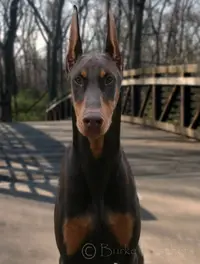
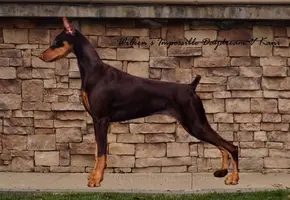
The guy who owns one of Aria's half brothers is doing all of the design work for us, but I thought it would be fun to play in photo shop to see what kind of pictures I could create. This is what I have done thus far. I feel the stacked photo needs a little work. I can still see the flowers and greenery around her head and nose and I couldn't figure out how to remove the shadow on her right hind foot. Her ear also looks faded to me at the tip.

Overall not bad for my first attempt. I took both the main picture and the background pictures, so I am pretty excited about this as a whole.

Without much adieu, here they are :)
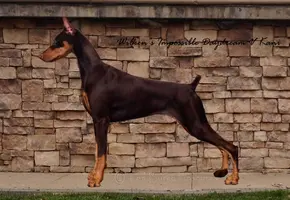
Aria stacked rock wm.webp Aria Bridge wm.webp
 
I think they look great! I never would've guess they were first attempts, especially that second one!

Having some photoshop experience myself, I'll try to give some feedback. I would recommend adding a shadow to the first one so it looks more natural and less like she was transplanted there. Try to incorporate her shadowed back foot in the shadow so that area doesn't seem so randomly dark. Also, on a very minor note, there is white on the back of her neck where it looks like you didn't get quite close enough when removing her from the original picture.
 
Thank you! I was hoping for feedback from experienced Photoshoppers, lol :)

I would love to add a shadow to the first pic. I can't figure out how to do it, haha. I thought about cropping out the one from the original photo and using it, but my breeder's feet are in the way and I wouldn't know how to edit that out either, lol.
 
I recommend looking for a tutorial. I would Google "how to make shadows in photoshop". I'm sure there will be tons!

Very basically. ... create a duplicate image of Aria, make it solid black, reduce the opacity and then stretch it and squish it down onto the ground so it looks like a shadow. Erase little bits here and there to make it fit.
Thanks so much! Sounds easy enough. Appreciate the help :)
 
Very nice, Archer!! What a beautiful model!!! She is stunning! :dance:

I know nothing about PS.....wish I did! I would love to figure out how to PS a background out of a picture myself! Years ago, before Windows 7 screwed with some on my old programs, I used to have something I think was called Micrographics. It was so easy to use!! I loved it and I still have many things saved in the program that I can no longer open with anything else. :cus:

I tried looking at a tutorial about the 'layering' and stuff but ugh, I was lost.

One day. lol
 
Thanks MB! She is a sweet girl.

I've had PS for over a year now and have been experimenting with it in the small amount of free time that I have. It's taken me that long to work up to this. Haha! A long time ago, I used to use paint to edit, but photoshop opened up a whole new world. My hubby edits with GIMP and he likes that program, but he refuses to use anything Apple related :rolleyes:
 
I gave up on PS years ago and have since mastered a much simpler yet equally powerful piece of photo editing software. My problem is that it has been deprecated for years so I can't manipulate new photo file types and no updates will ever be forth coming.
 
Wow!

No experience with PS,just wanted to comment on how drop dead gorgeous she is!Stunning!!

Carry on...
 
I gave up on PS years ago and have since mastered a much simpler yet equally powerful piece of photo editing software. My problem is that it has been deprecated for years so I can't manipulate new photo file types and no updates will ever be forth coming.
That sucks :( The importance is in the mastery. it will take me a billion years with the limited free time I have to work up any sort of mastery in PS. Baby steps ;)
 
Wow!

No experience with PS,just wanted to comment on how drop dead gorgeous she is!Stunning!!

Carry on...
lol

Awwww!! Thanks, Gel :) We think she is a pretty girl, but are a bit biased. She is turning out to be a beauty in looks and personality. She's a double whammy.
 
lol

Awwww!! Thanks, Gel :) We think she is a pretty girl, but are a bit biased. She is turning out to be a beauty in looks and personality. She's a double whammy.
Biased or not,no one could argue this isn't a beautiful dog.image.webpEven if she does have a shadowy right foot:D

Have you talked to Matt about Dr'ing the photos?He seems like he's got PS dialed in pretty well from work I've seen.
 
Biased or not,no one could argue this isn't a beautiful dog.Even if she does have a shadowy right foot:D

Have you talked to Matt about Dr'ing the photos?He seems like he's got PS dialed in pretty well from work I've seen.

haha, thank you very much :)

I have not talked to Matt. I am sure he is editing his photos of Berlin as she is in the ad as well. He is super busy at work atm and has not even been to the last few dog shows.
 
haha, thank you very much :)

I have not talked to Matt. I am sure he is editing his photos of Berlin as she is in the ad as well. He is super busy at work atm and has not even been to the last few dog shows.
Ah!A sisters photo shoot!!
 
Ah!A sisters photo shoot!!
Haha. For living so close to Matt, the girls rarely see each other. They haven't been to the last two shows :(

Your comment gives me a good idea. I think it would be fun to do a picture shoot of the three siblings, Walter, Berlin and Aria. Would that not be adorable??!!
 
Very nice job! I can't believe it's a first try since they look great.

The clone stamp also comes in very handy if you want to touch something up like her ear and you can work from the bottom of her ear up to make it look less transparent. It might also work for creating a shadow on her other foot if you put the clone spot on the shadow on the one foot and use it on the other one.

My Photoshop Elements program also has a magic eraser so if you have something like the green screen or a solid background, it will remove the whole background in one quick step.

MB, backgrounds are fairly easy to erase if there isn't a lot of busy stuff in it, then I save the main object with a transparent background, then start another layer with the background of your choice and paste the one with the transparent background into the new layer. My avatar is one of the Photoshopped ones with a photography background inserted. They were actually on our deck here. ;)
 

Back
Top